mirror of
https://github.com/meshtastic/firmware.git
synced 2025-08-19 19:53:18 +00:00

3.2 KiB
3.2 KiB
Build instructions
This project uses the simple PlatformIO build system. PlatformIO is an extension to Microsoft VSCode.
GUI
- Purchase a suitable radio.
- Install Python.
- Install Git.
- Reboot your computer.
- Install PlatformIO.
- Click the PlatformIO icon on the side bar.

- Under
Quick Access, Miscellaneous, Clone Git Projectenter the URL of the Meshtastic repo found here.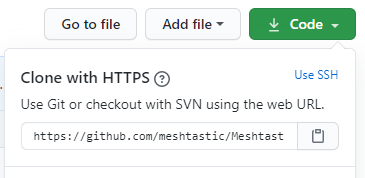
- Select a file location to save the repo.
- Once loaded, open the
platformio.inifile. - At the line
default_envsyou can change it to the board type you are building for ie.tlora-v2, tlora-v1, tlora-v2-1-1.6, tbeam, heltec, tbeam0.7(boards are listed further down in the file). - The hardware can be configured for different countries by adding a definition to the
configuration.hfile.#define HW_VERSION_USorHW_VERSION_EU433, HW_VERSION_EU865, HW_VERSION_CN, HW_VERSION_JP. Other country settings can be found inMeshRadio.h. The default isHW_VERSION_US. - Click the PlatformIO icon on the side bar. Under
Project Tasksyou can now build or upload.
Note - To get a clean build you may have to delete the auto-generated file ./.vscode/c_cpp_properties.json, close and re-open Visual Studio and WAIT until the file is auto-generated before compiling again.
Command Line
- Purchase a suitable radio.
- Install PlatformIO
- Download this git repo and cd into it:
git clone https://github.com/meshtastic/Meshtastic-device.git
cd Meshtastic-device
- Run
git submodule update --init --recursiveto pull in dependencies this project needs. - If you are outside the USA, run "export COUNTRY=EU865" (or whatever) to set the correct frequency range for your country. Options are provided for
EU433,EU865,CN,JPandUS(default). Pull-requests eagerly accepted for other countries. - Plug the radio into your USB port
- Type
pio run --environment XXX -t upload(This command will fetch dependencies, build the project and install it on the board via USB). For XXX, use the board type you have (eithertlora-v2, tlora-v1, tlora-v2-1-1.6, tbeam, heltec, tbeam0.7). - Platform IO also installs a very nice VisualStudio Code based IDE, see their tutorial if you'd like to use it.
Decoding stack traces
If you get a crash, you can decode the addresses from the Backtrace: line:
- Save the
Backtrace: 0x....line to a file, e.g.,backtrace.txt. - Run
bin/exception_decoder.py backtrace.txt(this uses symbols from the lastfirmware.elf, so you must be running the same binary that's still in your.pio/builddirectory).